
How to Register at BetAhoy
Opening an account takes three short steps and a couple of minutes. It is open to players aged 18 and over who live in the United Kingdom, and the balance runs in GBP. If you want to know what you are signing up to first, the BetAhoy overview covers the sportsbook and the casino.
The account is the key to everything on the site: betting, casino, the cashier and every promotion. Nothing below needs a code or a deposit to complete.
Before You Start
Have these to hand and the form will not stop you halfway.
- Your legal name and date of birth exactly as they appear on your ID.
- Your current UK address, including the postcode.
- A mobile number with the +44 country code.
- An email address you actually use, since password resets and account notices go there.
- Access to proof of identity and address, for the verification that follows later.
Two rules are worth knowing before you type anything. You must be 18 or over, and one account per player is the limit: a second registration on the same details is rejected rather than approved.
Step 1: Your Personal Details
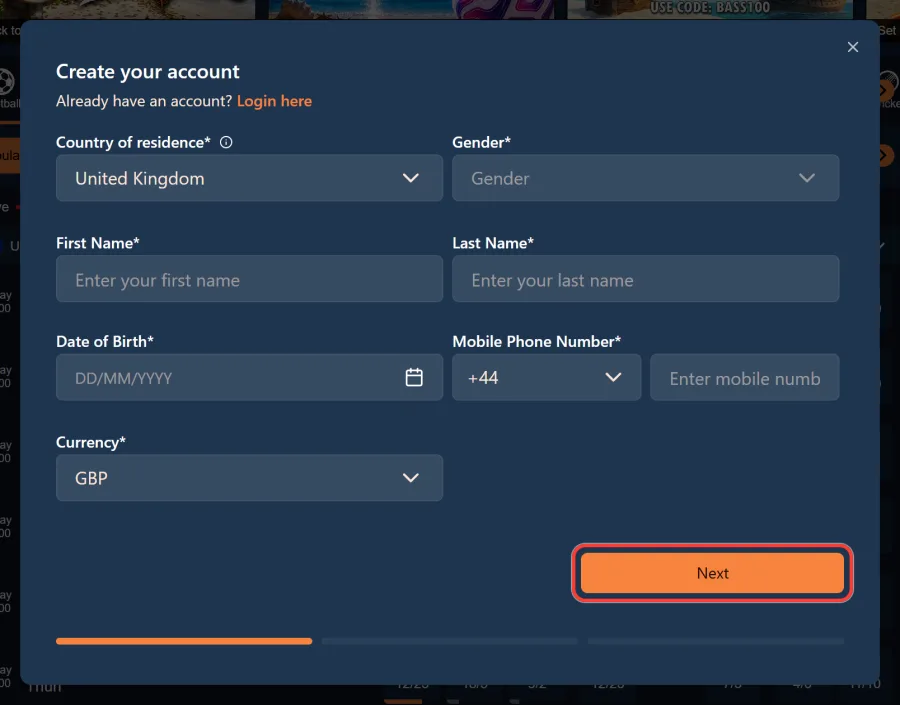
The Create your account window opens on personal details. Country of residence defaults to United Kingdom. Fill in gender, first name, last name and date of birth, which goes in as DD/MM/YYYY through the calendar picker. Add your mobile number with the +44 code, confirm the account currency as GBP, and press Next. Enter your name exactly as it appears on your ID: a mismatch here is what makes verification drag on later.
Step 2: Your Address
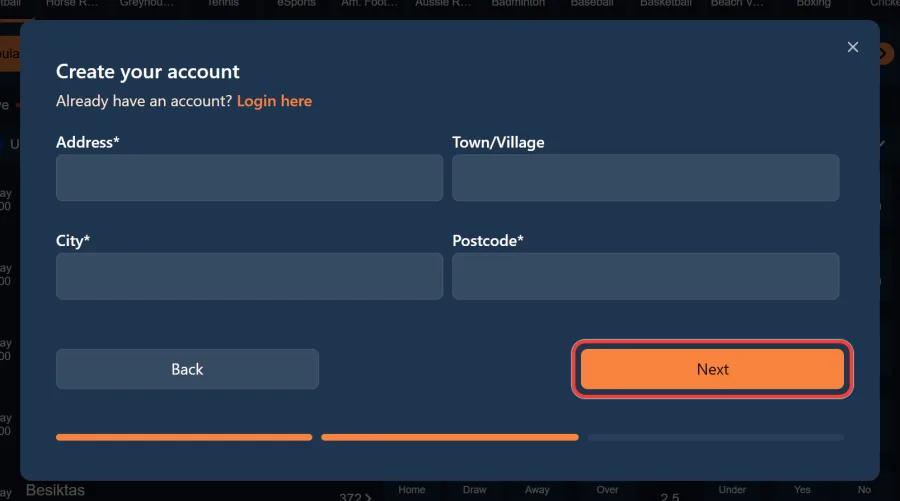
The second step is your address: street address, an optional Town or Village field, city and postcode. Back and Next sit at the bottom of the window, so a typo on the first step is easy to fix. The address is not there to fill space. The operator has to confirm you are resident in the UK under its licence conditions, and this is the detail that later gets checked against your proof of address.
Step 3: Login Details and Consents
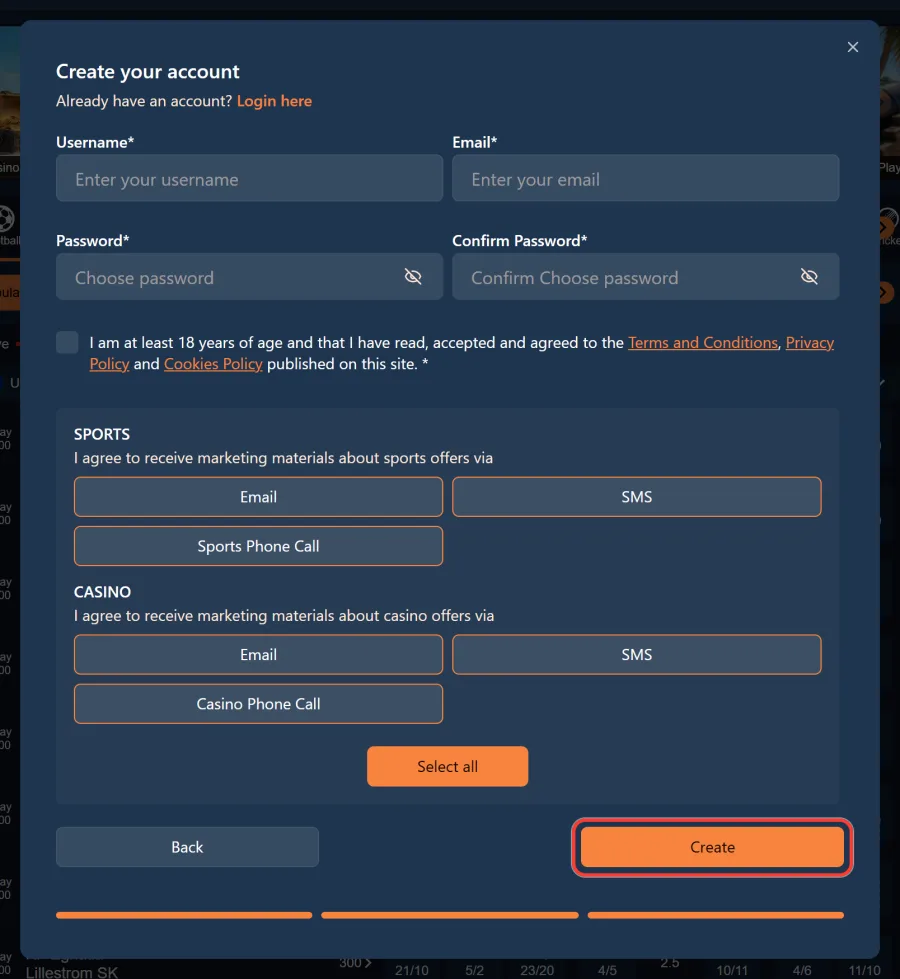
The last step sets up how you get in: username, email, password and confirm password. The password field has an eye icon if you want to check what you typed. Below it is the mandatory tick confirming you are at least 18 and accept the Terms and Conditions, Privacy Policy and Cookies Policy. Marketing consents for sport and casino are optional, with a Select all button if you want them. Press Create to finish. If you see User with this information already exists, a detail such as your phone number is already on an account.
Verify Your Account
Verification is not optional and it is not a BetAhoy invention. Every UK licensed operator has to confirm who you are under Gambling Commission rules, which is why the check exists on every licensed site.
It covers two things: proof of identity and proof of address. Documents are uploaded in your profile or sent to support, and the operator tells you exactly what it needs when it asks. Do not plan around a list you read elsewhere, because the request depends on the account.
The important part is timing. Verification has to be complete before you can withdraw your winnings, so doing it in the first quiet moment after registering is far less annoying than doing it on the day you want your money.
Names that do not match the ID are the most common cause of delay, which is why the first step of the form matters more than it looks.
Claim Your Welcome Offer at Sign Up
The promo code is not part of the registration form. Once the account exists, open Account and then My Bonuses, and enter the code there.
There are two to choose from and they do not stack. ALLABOARD10 is the sports offer: a qualifying bet of £10 or more at odds of 2.0 or greater returns £10 in free bets. BASS100 is the casino offer: stake £10 in cash on Big Bass Splash and 100 free spins land at £0.10 each.
Both are new customer offers, one per player, and each has its own wagering and expiry rules. The full conditions for both, along with everything running for existing customers, are on the welcome offers and promo codes page.
Promocode
ALLABOARD10
Registration Problems and How to Fix Them
Four things stop registrations, and three of them are quick to fix.
If the form returns User with this information already exists, some detail you entered is already on an account. The mobile number is the usual culprit, followed by the email address. If you have registered before, do not create a second account: that breaks the one per player rule.
If the confirmation email never arrives, check the spam folder first and confirm you typed the address correctly. If the form refuses to move past a step, a required field is empty or the date format is wrong, since dates go in as DD/MM/YYYY.
The fourth is different. If your account is closed under self exclusion or through GamStop, registration is blocked until that period ends and support cannot override it. For anything else, live chat or [email protected] will sort it, and existing customers should simply log in to your account instead.
Registration FAQ
The questions new customers ask before signing up.
Play Responsibly
The best time to set your limits is the day you open the account, before there is a balance to protect.
Deposit limits and time outs are available in the responsible gambling section of your profile from the moment you register, and self exclusion is there if you need to stop entirely. Age verification applies to everyone: BetAhoy is an 18+ site.
GamCare and GambleAware offer free confidential help, and GamStop blocks access to every UK licensed operator at once.